Monday, January 16, 2012

Bella Blvd Sneak Peek Weeks Kicks Off!


With just two weeks until CHA, Bella Blvd is starting off the first of two sneak peek weeks today. If you haven't already bookmarked the Bella Blvd blog, you might want to do that. Every day this week and next, one full set of whatever is being revealed that day will be given away on the Bella Blvd blog. That's right, there will be a winner every day!

First up? The Baby Boy collection. As usual, Bella Blvd has a great mix of themed papers, basic patterns, bright colors, and lots of fun and whimsy! While it would be obvious to use this line for baby boy layouts, cards, and projects, I see lots of other potential here: Father's Day, springtime, zoo, boys, birthday, Valentine's Day, etc. Be sure to check out the embellishments - in addition to the old Bella Blvd standby embellishments, flags are new with this release. Yes, flags. The flags come in sets of three and are definitely something I'm excited about!


So...if you haven't already clicked over to the Bella Blvd blog, please do so to get a closer look at this line and make sure to leave a comment while you're over there (not here, although comments here are always appreciated!) to be entered to win the Baby Boy collection!

I'll be back later today with my usual Monday post, so be sure to check back later for that! Also, make sure to check back here and at the Bella Blvd blog this week and next for sneak peeks!


Friday, January 13, 2012

Fabulous Finds on Friday: How to Survive Without Photoshop

Week two and I have already fallen off the blogging bandwagon. Please forgive me! Dusting myself off after an unusually busy week and picking back up with today's Friday finds.

I was long terrified of Photoshop (still am, but finally bought Elements a couple of weeks ago) and managed for a very long time without it. Two free photo editing tools helped me out a lot. 

The first photo editing tool is the online photo editing website Picnik. It's free, although you can upgrade to Picnik Premium and pay a monthly fee for access to all kinds of additional editing tools. The basic editing features can do a lot for a photo with a couple of clicks. The "Effects" tab offers some more sophisticated editing options. There are also tools that allow you to add text, graphics, and seasonal elements to your photos. The best part is that you can upload photos, edit, and then save them to your computer without having to manage yet another gallery of images online. Although, if you want to edit and post, there are buttons that allow you to do that quickly to Facebook, Twitter, Flickr, etc.

Picnik even has a handy tool under the frame tab that allowed me to upload and edit a photo and then show the "before" photo and the "after" photo:


The second photo editing tool is the free downloadable Photosheet program. Photosheet allows you to quickly and easily collage photos together by clicking and dragging them into the application. There are a ton of pre-set collages (for example: 4" X 6" with 2 photos, 8" X 10" with 6 photos, etc.) so all you have to do is choose one, click and drag your photos, hit save, and then print it out. I've done more layouts than I can count using Photosheet! 

I know I already shared this layout a couple of weeks ago, but it's a great example of what Photosheet can do. I created a six photo 4" X 6" collage, saved it, and printed it out. The whole process took me about two minutes to do, literally two minutes. Think about how long it takes to click and drag six items, hit save, open a saved file, put photo paper in the printer, and hit "print."


Cardstock: Bazzill Basics + Patterned Paper: October Afternoon + Die Cuts: October Afternoon (cablegram), Silhouette (mustaches, airplane ticket ) + Stickers: October Afternoon + Rubber Charm: October Afternoon + Tin Pin: October Afternoon

Hope that these links prove useful to some of you!


Tuesday, January 10, 2012

Tuesday Tip: Don't Get Rid of Those Holiday Cards Just Yet!

Getting my Tuesday post up a bit later than I had hoped, but for a good reason. After hearing yet another story about photos being lost my computer was consumed last night with backing up all our photos online. I tried to simultaneously blog but it just wasn't happening.

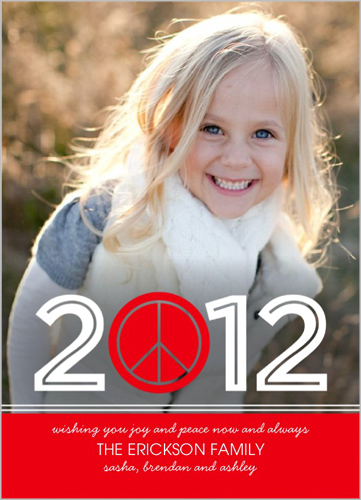
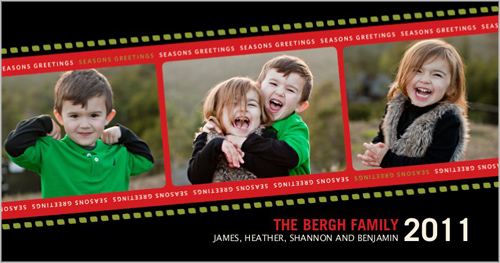
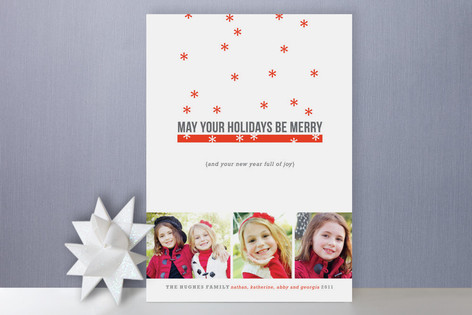
I was struck this year by how cool the designs were on many of the holiday cards we received. I've flagged a few of them for design inspiration. I don't want to share the actual cards here without my friends' permission, so I'm pulling the stock images from the card companies' websites so that I can share with you here my three favorite designs. I haven't made anything inspired by them yet, but ideas from these cards are bound to turn up here sooner or later! :)

1. I loved the idea here of placing a title on the photo and replacing one of the letters with a graphic icon. I love how the numbers and peace sign have cut-out lines in their centers, allowing bits of the photo to peek through. I am thinking this type of effect would be pretty easy to replicate with my Cameo. This card is a Petite Lemon card from Shutterfly:


2. I adore the diagonal lines on this one and the fun filmstrip look. This is Pottsdesign card from Shutterfly:


3.  Imagine my surprise when I received this card from a non-scrapbooking friend, who had chosen one of Kim Morgan's (a former fellow Write.Click.Scrapbook. team member) designs from Minted! :) I love the positive/negative effect with the red and white snowflakes and love all the white space:


Forget Pinterest, I think I need to start browsing all of the card websites for design inspiration! Did you get or give a card this year that provides good design inspiration? If so, leave the link to it in the comments here!


Monday, January 9, 2012

Monday Make Something: Blog Layout

Today I participated in Wilna Furstenburg's Monday Challenge over on the October Afternoon blog. Her challenge is to create a layout about your 2012 creative goals. I decided to create a layout about my 2012 blogging goals. It's a very simple layout centered around my blog header printed out on photo paper:

Cardstock:Bazzill Basics + Patterned Paper:October Afternoon + Chipboard:October Afternoon + Stickers:October Afternoon + Baker's Twine:October Afternoon + Pen:Sakura + Font: TW Cen MT
I am pondering some other 2012 creative goals as well. I'm not sure that I'm ready to commit to them just yet, though! If I do I'll be sure to let you know.


Friday, January 6, 2012

Friday Fabulous Find: The Colour Suite

I have long been a fan of Scrapbook & Cards Today (if you don't know it, it's a Canadian magazine), and have also long been a fan of Summer Fullerton's clean-lined and colorful work. Therefore, I was thrilled when the two came together in a big way last summer when Scrapbook & Cards Today launched The Colour Suite challenge on their website. I've been popping over there to ogle the gorgeous color combos and Summer's work ever since. I checked with Summer and she promised me that the challenge is continuing in 2012!

So...if you haven't already clicked on The Colour Suite, go ogle!


Thursday, January 5, 2012

Thrifty Thursday: Start With A Collection You Love

One of my all-time favorite paper collections ever was Cosmo Cricket's The Boyfriend line:

Normally I would link to the paper on the company's website, but they only show a couple of pieces since it's an older line. Lucky for you, I found this image online that shows the whole collection!
The Boyfriend included a fun mix of school-themed papers and embellishments along with lots of funky icons related to music, video games, etc. and also had some basic striped, grid, and lined papers. Basically, The Boyfriend fit my description of a perfect paper line: bright colors + basic patterns + whimsical designs + paper you can journal on (are you listening, manufacturers? :)). I love lines like this because you can use them in so many different ways.

One of the benefits of being a very simple scrapper is that even when I've used a collection on many layouts and cards I have a lot left over. I go through my papers and purge things once or twice a year, but some products I just can't give away. But...do I ever go back and use them? Rarely.

(Note for those non-scrapbookers reading this: there is huge product turnover in the papercrafting industry. There are two major trade shows a year, one in January and one in July. Most manufacturers produce 2-4 new lines per show and in the last couple of years there's also been a trend to have a "mid-release" line or two that come out between shows. Product is considered old by the time the next trade show rolls around, and ancient after a year.)

So...enter this whole Thrifty Thursday concept. Every Thursday I'm going to attack my stash of older products from a different viewpoint (until I run out of viewpoints, and then I'll run through them again with more things from my stash :)). This week I started with a collection I loved: The Boyfriend (shh...don't tell my husband about The Boyfriend...).

I pulled out the papers and thought about what to scrap. I decided that this line would be a perfect starting place for a photo-less layout about our recent visit to the Grammy Museum in Los Angeles. From there I went crazy. Here's the layout:

Cardstock (Bazzill Basics) + Patterned Paper (Cosmo Cricket, American Crafts) + Stickers (Lily Bee, Sassafrass, American Crafts, Creative Imaginations) + Font (Dance Floor Exit)

Here's my process.


1. I downloaded a fun dingbat font from dafont called Dance Floor Exit. I used my Cameo to cut out five dancing figures and layered them with pop dots on the yellow tone-on-tone audiotape patterned paper from The Boyfriend. I also added a strip of striped paper and a handcut boom box and speech bubble from the same collection. I added some more recent Lily Bee alpha stickers to the speech bubble.


2. Next, I went digging through all of my old Thickers for a set that would work and chose the Dolce font in Apricot.


3. After adding some of the tickets from our visit and the handcut pieces from The Boyfriend, I though I needed some more embellishments and started digging through my stash. The old star sticker from Sassafrass surfaced, as did the "so cool" epoxy sticker from Creative Imaginations.


4. The star looked like it wanted company, so I tried to remember whether I had any older star paper and came up with this bit from American Crafts.


I started with an older collection I love, and ended up digging into products from five different manufacturers (six if you count the cardstock). I created a layout I love that doesn't look dated to me even though I used some old and some ancient products.

So...if this idea appeals to you and you want to play along, start with an older collection you love and go from there. In fact, if you are playing along, comment here and tell me what older collection you love (hey, I could use some more inspiration!), and then, if you do create something, come back here and link me up in the comments.

By the way, when Sadie saw The Boyfriend she loved him, too. (I wasn't expecting that for another decade or so.) She started to make her own layout about the Grammy Museum but isn't done yet. I'll post it on my blog once she's done.


Wednesday, January 4, 2012

Wednesday We: Winter Break Ends

Yesterday was the last day of winter break. I took the entire two and a half weeks off with the kids, which was lovely. Seth had the time off as well. Or, more accurately, I should say he was free of scheduled commitments, as he spent most of his "vacation" crunching numbers and writing. (In case I haven't mentioned it before, he's a professor of political science.)

We had a nice break, with a four-day trip to Los Angeles to see family and friends, Hanukkah celebrations in Los Angeles and back at home, and our first Christmas dinner ever thanks to an invitation from old friends who recently moved to our neck of the woods. We rented lots of movies and saw "The Adventures of Tintin" in the theater, read, played games, made art, had playdates, baked, cooked, and took on a lot of major cleaning and purging projects.

We celebrated the last day of vacation by having lunch out at Sadie's favorite Chinese restaurant, recorded for posterity in this iPhone egg drop soup photo:

Note: Sadie's lunch did not come with soup; she stole mine.

The kids also spent hours today with their Ed Emberley book drawing pirates and penguins and pandas. Clearly, they were stuck on "P"s! I used to draw from Ed Emberley books when I was a kid and it's neat to see the next generation doing the same thing. 

The evening was all about the Iowa caucuses. Seth follows major election events closely for his research and teaching, and can, like tonight, usually be found following such events sitting on the couch with the TV on, his laptop on his lap, and his iPhone in his hand. It's so funny how the kids get sucked in as well. When I tucked Eli into bed he wanted me to come back upstairs in ten minutes to let him know what percentage of the votes were in yet and who was ahead.  

I think today is going to be a little hard for all of us as we return to reality, but I'm sure that we'll have settled back into the routine within a day or two.

Stay tuned for tomorrow's first Thrifty Thursday, when I will dig back into my stash of products and start using up some of the stuff I can't bear to part with.


Related Posts with Thumbnails